Blog · · Matt Pritchett
Should I block GPTBot? What it changes, and what it doesn't
Blocking GPTBot tells OpenAI not to train on your pages. It doesn't take you out of ChatGPT search, which uses a different crawler. Here's how to decide with your own numbers.
Block GPTBot if you don't want OpenAI to train its models on your pages. Blocking it won't take you out of ChatGPT search or cut the visitors ChatGPT sends you, because those come through a different OpenAI crawler, OAI-SearchBot. You can block one and allow the other.
Before you decide, it helps to know which OpenAI bots read your site, how often, and whether ChatGPT sends anyone back.
What GPTBot does
GPTBot is OpenAI's training crawler. In OpenAI's words, it is used "to crawl content that may be used in training our generative AI foundation models." GPTBot collects pages for training and sends no visitors itself.
So the choice about GPTBot is a choice about training. It has nothing to do with whether people find you in ChatGPT.
OpenAI's three bots, side by side
OpenAI documents its crawlers on one page, Overview of OpenAI Crawlers. Three of them show up on most sites:
- GPTBot collects pages that may be used to train OpenAI's models. Disallowing it in robots.txt tells OpenAI your content should not be used for training.
- OAI-SearchBot finds pages for ChatGPT's search features. OpenAI says sites that opt out of it "will not be shown in ChatGPT search answers, though can still appear as navigational links." This is the bot that matters for being cited and clicked in ChatGPT.
- ChatGPT-User fetches a page when someone asks ChatGPT or a custom GPT something that needs it. It doesn't crawl on its own, and OpenAI says that because these visits are started by a user, "robots.txt rules may not apply."
OpenAI says plainly that "each setting is independent of the others." Its own example is a site that allows OAI-SearchBot to appear in search while disallowing GPTBot so its content isn't used for training.
What blocking GPTBot changes
It tells OpenAI not to use your pages to train its foundation models. That is the whole effect.
What it doesn't change
- Your place in ChatGPT search. That depends on OAI-SearchBot.
- Visits from people who click a link in a ChatGPT answer. GPTBot never sent those.
- ChatGPT-User fetches, which robots.txt may not cover.
- Requests from scrapers that put GPTBot in their user agent. A robots.txt rule is a request that well-behaved bots follow, and impostors won't be stopped by it.
That last point matters more than most guides say. Any request can call itself GPTBot. We wrote about it in GPTBot in your logs might not be GPTBot and How to check whether a GPTBot hit is really from OpenAI. If the GPTBot traffic you want to stop comes from somewhere other than OpenAI's addresses, robots.txt won't touch it.
The robots.txt rules for each choice
To block training and stay in ChatGPT search:
User-agent: GPTBot Disallow: /
User-agent: OAI-SearchBot Allow: /
To block both, so ChatGPT search won't show your pages in its answers either:
User-agent: GPTBot Disallow: /
User-agent: OAI-SearchBot Disallow: /
OpenAI notes it can take about 24 hours after a robots.txt change for its search systems to adjust. It also recommends allowing requests from its published IP ranges, so check your firewall and CDN rules too if you want OAI-SearchBot in.
Check your own numbers first
The decision is easier with your own numbers in front of you. Two questions decide most cases:
- How much does GPTBot really crawl, counting only requests from OpenAI's own addresses?
- Does ChatGPT send you any visitors?
If GPTBot crawls heavily and ChatGPT sends nobody, you lose nothing in referrals by blocking it, since those referrals never depended on GPTBot. If ChatGPT does send visitors, keep OAI-SearchBot allowed whatever you decide about GPTBot.
AI Crawl Report shows those two numbers per bot: crawl requests (pages a bot fetched) and referred visits (people who clicked through from that company's AI engine), side by side for 7, 30 or 90 days. Hits are checked against the IP lists the AI companies publish. A hit that can't be traced to its company is marked claimed, so you can see how much of your "GPTBot" traffic is really OpenAI.
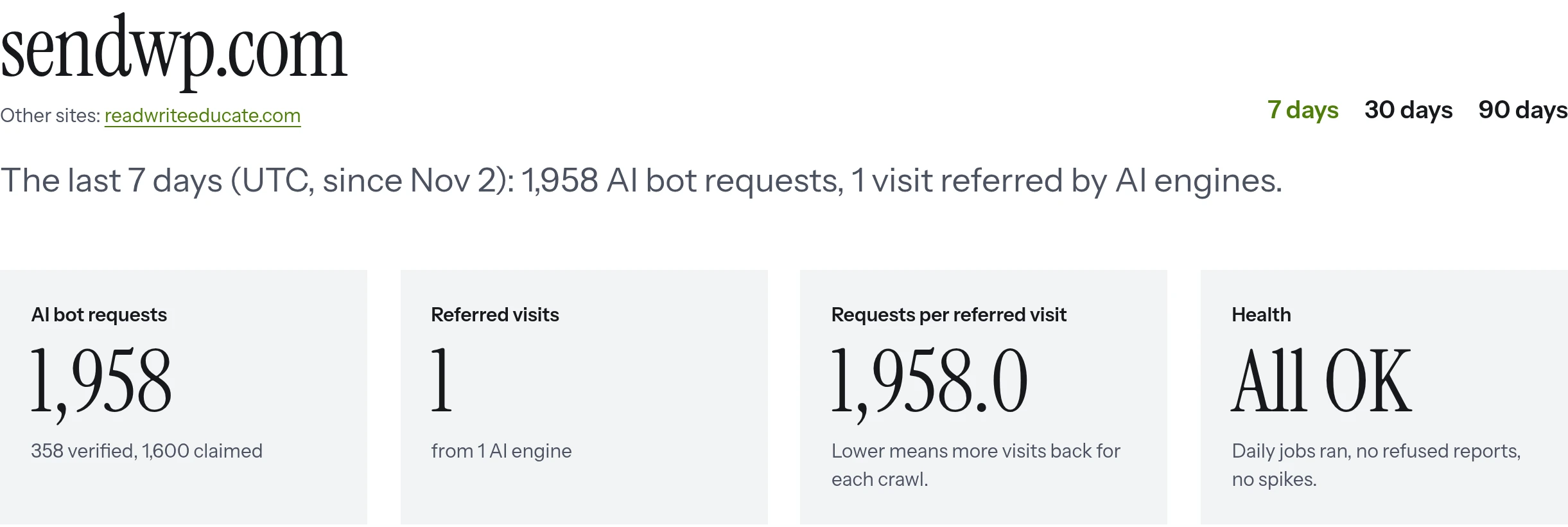
Two limits to keep in mind. A referred visit doesn't mean a crawl got you cited, and AI answers that cite you without anyone clicking through can't be seen from your site. And requests served from a full-page cache never reach WordPress, so counts can be lower than server logs.
What the plugin does and doesn't do about blocking
The plugin doesn't block bots. It can add rules to the robots.txt WordPress generates (off until you tick a box). Bots that ignore robots.txt, and impostors, won't be stopped. If you keep a real robots.txt file on disk, it replaces the one WordPress generates, and the report warns you about it.
See your own bots
On WordPress, get the free plugin: it's free and GPL-licensed, with no account, no key and no limits, and its data stays on your site. Run it for a week, look at GPTBot's verified crawls next to ChatGPT's referred visits, then decide. On another stack, join the waitlist for the hosted tracker, which is in private beta.