Blog · · Matt Pritchett
PerplexityBot in your logs: crawls vs. visitors sent back
PerplexityBot crawling your site tells you Perplexity fetched pages, not that it sent anyone. Put crawl requests next to referred visits to see what you get back, and know what your own traffic can't show.
PerplexityBot is Perplexity's crawler. When it shows up in your logs, Perplexity is fetching your pages. That is all the log line tells you. To see whether it pays off, put two numbers side by side: how many pages PerplexityBot fetched, and how many people clicked through to your site from Perplexity. This post shows how to read both, and what neither can tell you.
What PerplexityBot is
PerplexityBot is the user agent Perplexity uses to find and link websites in its search results. Perplexity's crawler documentation says it is not used to crawl content for AI foundation models, and Perplexity publishes PerplexityBot's addresses at perplexitybot.json.
Perplexity also runs Perplexity-User, which fetches a page when a person asks Perplexity a question. Perplexity says it isn't used for general crawling, and because a person asked for the fetch, it generally ignores robots.txt rules.
A crawler fetching a page is different from a person arriving from the engine. They are two separate events, and you need to measure each one.
Two numbers for each bot
AI Crawl Report shows two numbers per bot:
- Crawl requests: pages the bot fetched.
- Referred visits: people who clicked through from that company's AI engine.
They sit side by side for 7, 30 or 90 days. For Perplexity, that means PerplexityBot's crawl requests next to visits that came from Perplexity.
Read the pair like this:
- Many crawl requests and few referred visits: Perplexity reads your pages, but few readers follow a link to you.
- Few crawl requests and some referred visits: people still arrive from Perplexity, so look at which pages they land on.
- Both near zero: either the bot hasn't found you, or it is blocked, or your cache is hiding it (see below).
Neither number is a verdict. A low ratio is a fact about your traffic, not a ruling on whether Perplexity is worth your attention.
Here is what that looks like on real traffic. This is the dashboard for sendwp.com over 7 days, from the tracker pilot:
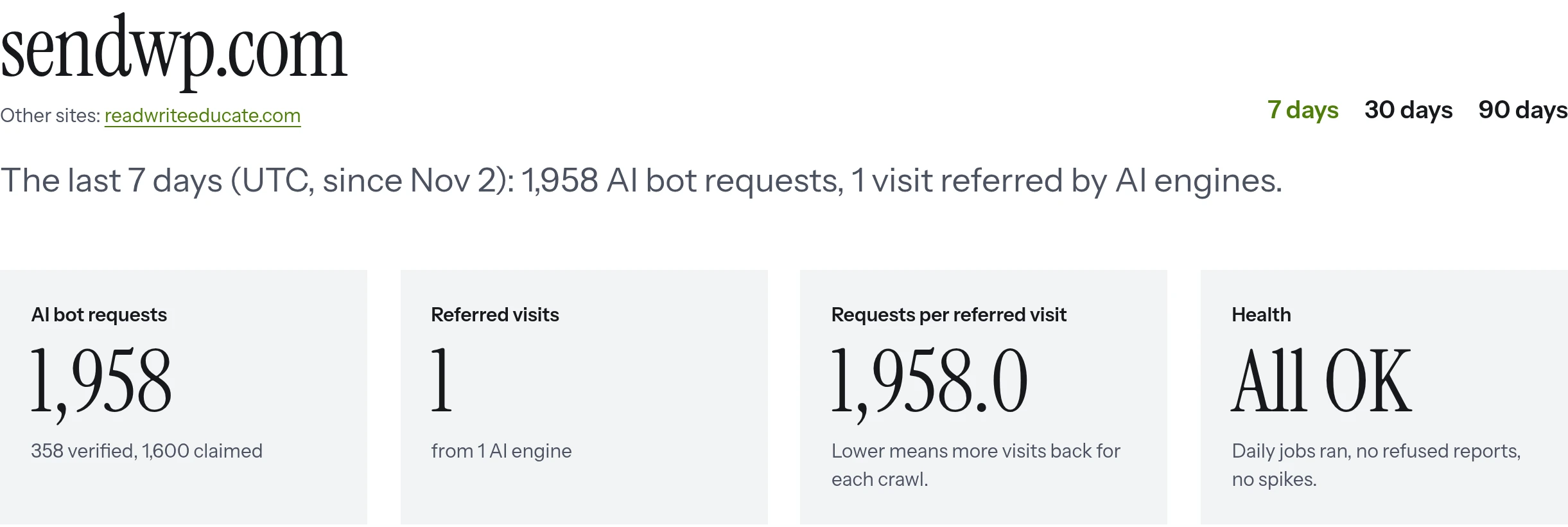
Nearly two thousand bot requests, one referred visit. Bot activity and human visits can be far apart. The screenshots come from sendwp.com traffic during the pilot, Nov 3 to 8, 2026.
What your own traffic can't show
A referred visit doesn't mean a crawl got you cited. A crawl doesn't prove a citation either.
There is also a blind spot. AI answers that cite you without anyone clicking through can't be seen from your site. If Perplexity names your page in an answer and the reader never visits, nothing reaches your server. Your numbers will undercount how often you appear. Any tool that only looks at your own traffic has this limit, ours included.
So use the two numbers for what they are: a record of what reached your site.
Verified or claimed
Anyone can send a request with "PerplexityBot" in the user agent. So AI Crawl Report checks each hit against the IP lists AI companies publish. A hit it can trace to the company is marked verified. A hit it can't trace is marked claimed.
Claimed does not mean fake. Some companies publish no way to check. Meta, ByteDance and Cohere are examples, so their hits are always claimed. Perplexity publishes IP lists for PerplexityBot and Perplexity-User, so their hits can be verified against them. A hit from outside those lists shows as claimed.
The sendwp.com bot table shows the split in practice:
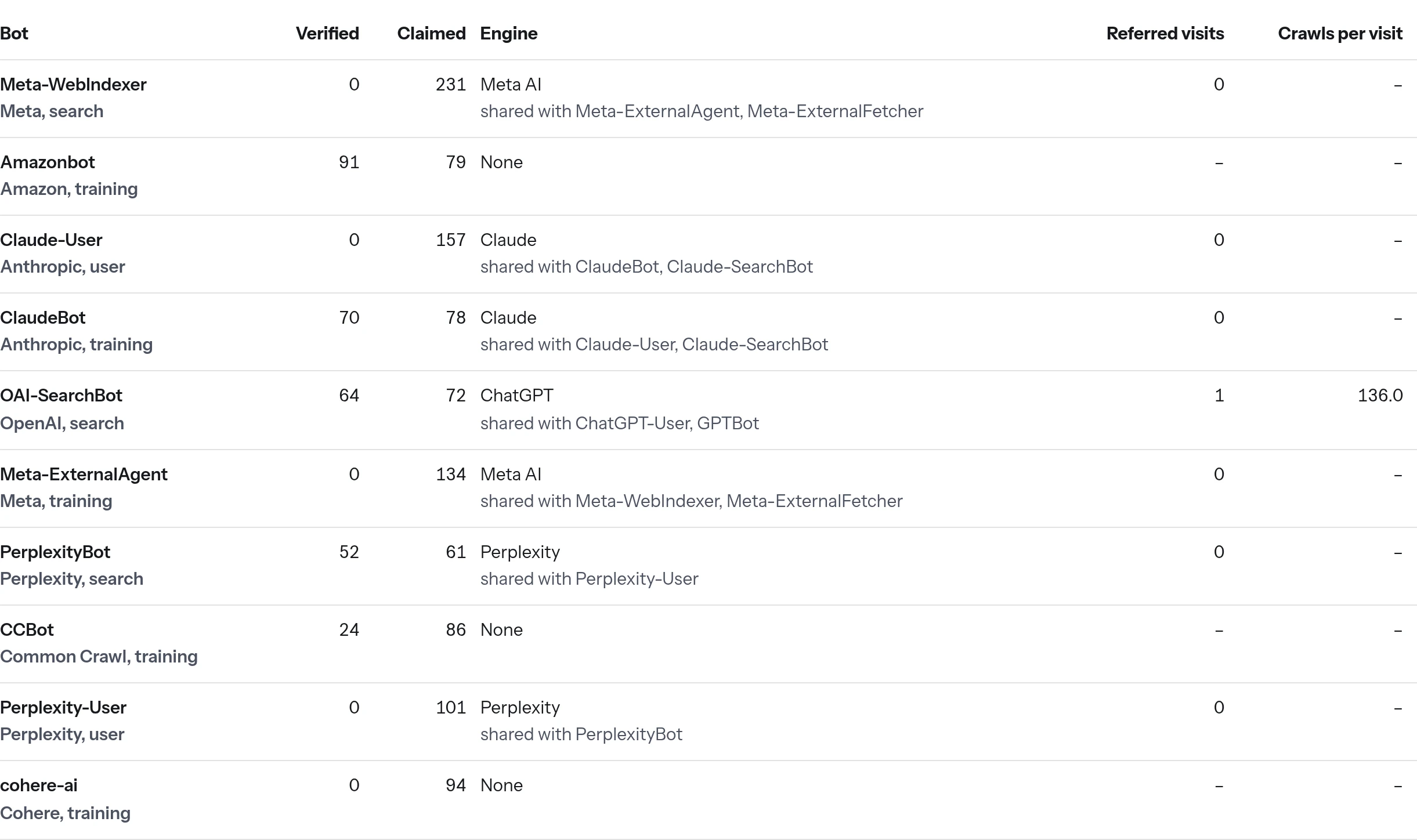
For more on why a name in a log is not proof of who sent it, read GPTBot in your logs might not be GPTBot. The same reasoning applies to PerplexityBot.
Why your counts may be lower than your server logs
Requests served from a full-page cache never reach WordPress. The plugin only sees what WordPress handles, so its counts can be lower than your server logs show. If your server log shows more PerplexityBot hits than the report, a page cache is the first thing to check.
Behind a proxy or CDN, the plugin may see the proxy's address instead of the bot's. Pass the real address with the aiccr_client_ip filter, or the IP checks can't work properly.
How the plugin collects the data
The plugin, AI Crawl & Citation Report, runs on your own server. It writes one row only when an AI bot or AI referral shows up. Bot checks and pruning run once a day in WP-Cron, and rows older than 90 days are deleted. Its data stays on your site. The only outside requests are the downloads of the bot IP lists.
Blocking is a separate step
The plugin doesn't block bots. It can add rules to the robots.txt that WordPress generates, but that is off until you tick a box. Bots that ignore robots.txt, and impostors, won't be stopped by it. Also, a real robots.txt file on disk replaces the one WordPress generates, and the report warns you if that is the case.
Look at the numbers first, then decide whether to allow or disallow PerplexityBot. Perplexity's documentation asks you to allow PerplexityBot in robots.txt if you want your site in its search results, and says Perplexity-User generally ignores robots.txt. The free robots.txt generator for AI bots writes those rules and says what each one changes.
The hosted tracker for other stacks is in private beta, so it is not open to everyone yet. For setup details and what it sends, see what the tracker sends, or the questions and answers.
If you run WordPress, you can see your own PerplexityBot crawls and Perplexity visits today. Get the free plugin. It has no account, no key and no limits. If you use another stack, join the waitlist for the hosted tracker. It is in private beta, and we email once when it opens to more.