Blog · · Matt Pritchett
How to check whether a GPTBot hit is really from OpenAI
A GPTBot user agent proves nothing, because anyone can copy it. Check the source IP against OpenAI's published list, and treat anything that doesn't match as claimed, not fake.
To check whether a GPTBot hit is really from OpenAI, take the source IP address from your server log and compare it with the IP list OpenAI publishes in its own documentation. If the address is on the list, the hit is verified. If it isn't, the hit is only claimed. The user agent string alone tells you nothing, because anyone can send "GPTBot" in a request.
This page shows how to do the check by hand, what the two results mean, and how AI Crawl Report does it for you on WordPress.
Why the user agent isn't enough
A user agent is a line of text the client sends with each request. A script written this afternoon can send the same text GPTBot sends. Your log will show "GPTBot" either way.
The source IP is much harder to fake for a request that has to get a response back. OpenAI publishes the address ranges its crawlers use, so you can compare the two. We cover the wider problem in GPTBot in your logs might not be GPTBot.
Step by step: check a GPTBot hit by hand
- Find the hit in your access log. Note the IP address and the user agent.
- Open OpenAI's bot documentation and find the published GPTBot IP list. OpenAI documents its crawlers in OpenAI's bots documentation, and publishes GPTBot's list at openai.com/gptbot.json.
- Check whether the IP falls inside one of the listed ranges. Ranges are written in CIDR form, such as a /24, so the address doesn't have to match a line exactly. It only has to sit inside a range.
- Record the result: on the list, verified. Not on the list, claimed.
- Re-download the list from time to time. Operators change their ranges.
Doing this for a handful of hits is fine. Doing it for every hit, every day, is a job for software.
Verified versus claimed
Verified means the request came from an address on the company's published list. Claimed means the user agent says it is that bot, but the address can't be traced to the company.
Claimed does not mean fake. Some operators publish no list at all. Meta, ByteDance and Cohere, among others, publish no way to check, so their hits always show as claimed. That doesn't prove they are fake. It means you can't confirm them. For GPTBot, a claimed hit means the address wasn't on OpenAI's list when you checked. Treat it as unconfirmed.
Amazon (Amazonbot) and Common Crawl (CCBot) publish lists too, and Common Crawl also supports a reverse DNS check. AI Crawl Report adds reverse DNS as a fallback for those two.
What GPTBot does, and what it doesn't
GPTBot collects pages for training. It sends no visitors itself. If you want to know whether ChatGPT sends people to you, GPTBot is the wrong bot to watch. ChatGPT finds pages to cite through OAI-SearchBot.
To opt out of training and still be citable in ChatGPT, block GPTBot and leave OAI-SearchBot alone. The free robots.txt generator for AI bots writes those rules for you and says what each one changes.
A crawl also isn't a citation. A bot fetching your page doesn't prove an AI answer will cite you. And a visit from ChatGPT doesn't mean a crawl got you cited. AI answers that cite you without anyone clicking through can't be seen from your own traffic.
Let the plugin do the check
The free WordPress plugin, AI Crawl & Citation Report, checks each hit against the IP lists the AI companies publish. It recognizes 27 known AI bots by user agent and labels every hit verified or claimed. It shows two numbers per bot side by side, for 7, 30 or 90 days: crawl requests, which are pages a bot fetched, and referred visits, which are people who clicked through from that company's AI engine.
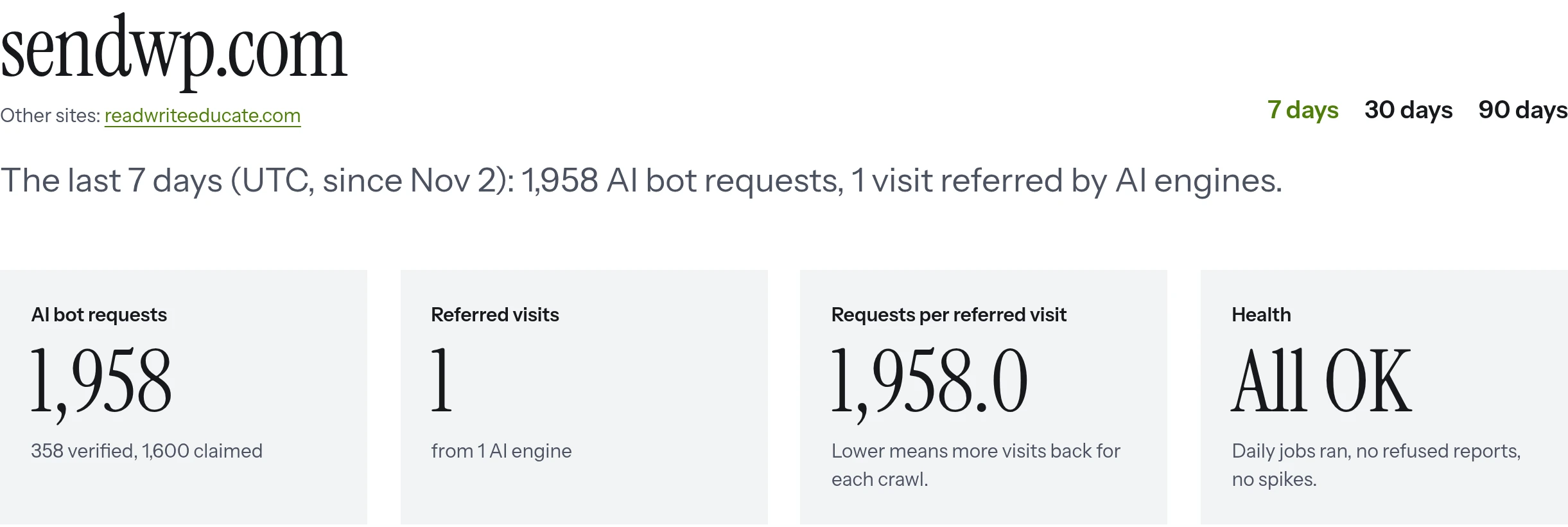
Here is real traffic from sendwp.com, taken from the tracker pilot between Nov 3 and 8, 2026. Over 7 days it shows 1,958 AI bot requests: 358 verified and 1,600 claimed.
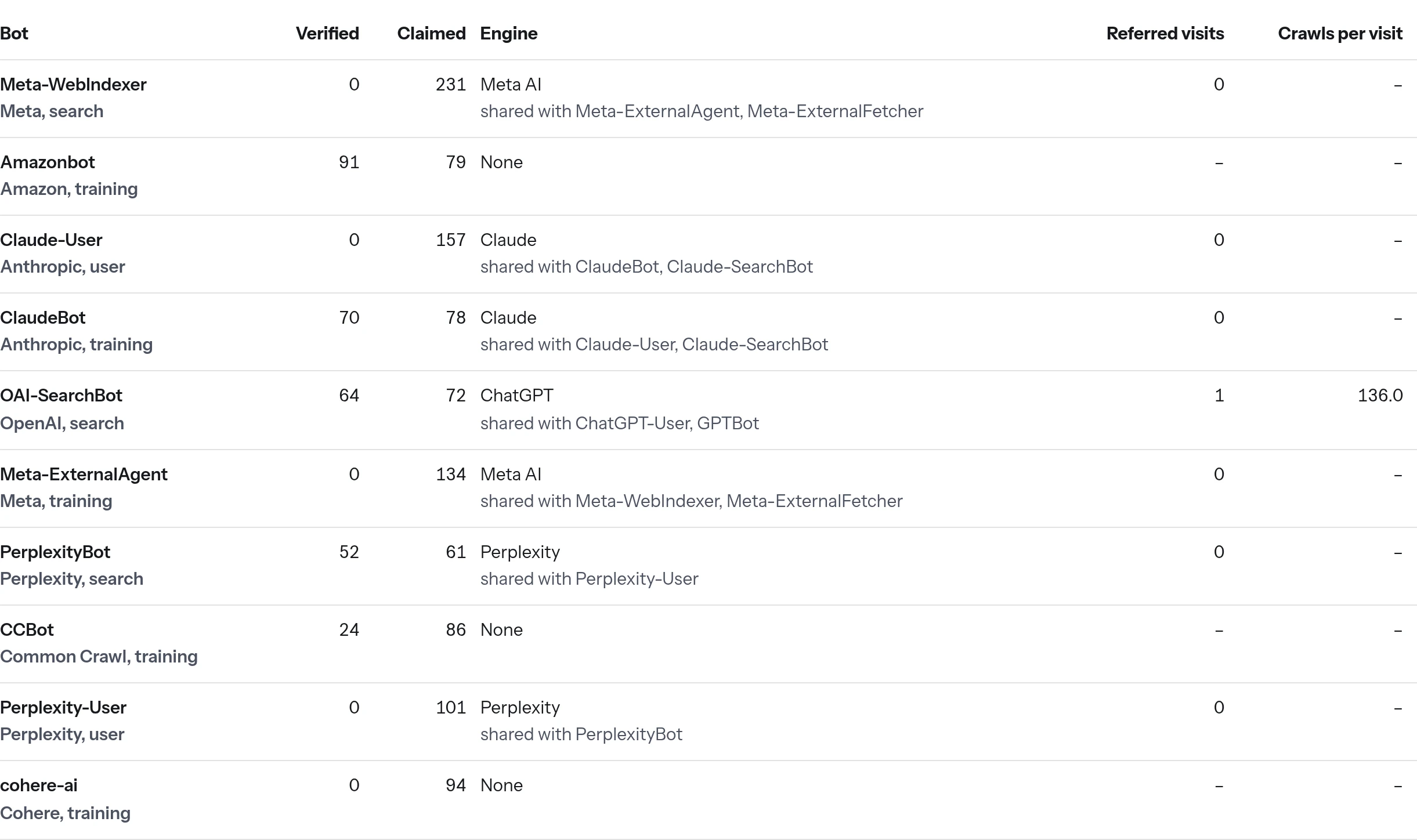
The bot table splits the same hits by bot, so you can see which ones are verified and which are only claimed.
A few practical notes on how the plugin works:
- It writes one row only when an AI bot or AI referral shows up. Bot checks and pruning run once a day in WP-Cron, and rows older than 90 days are deleted.
- Its data stays on your site. List downloads are the only outside requests.
- It needs no account, no key and has no limits.
If your site sits behind a proxy or CDN
Behind a proxy or CDN, the address WordPress sees may be the proxy's, not the visitor's. The check then runs on the wrong IP. Pass the real address to the plugin with the aiccr_client_ip filter.
What can skew the numbers
- Requests served from a full-page cache never reach WordPress, so the plugin's counts can be lower than your server logs.
- The plugin doesn't block bots. It can add rules to the robots.txt WordPress generates, but that is off until you tick a box. Bots that ignore robots.txt, and impostors, won't be stopped.
- A real robots.txt file on disk replaces the one WordPress generates. The report warns you if that happens.
Not on WordPress?
The hosted tracker works on any stack: one script tag in your pages, plus a Cloudflare Worker deployed in your own Cloudflare account, one PHP file, or a Node/Express middleware. It sets no cookies. It is in a private beta on our own sites, and there is a waitlist. See what the tracker sends and the questions, answered page for more.
On WordPress, Get the free plugin and see which of your GPTBot hits are verified. On any other stack, Join the waitlist for the hosted tracker. It's in private beta, and we email once when it opens to more sites.